
Top 6 CRM Features Life Insurance Agents Should Look For
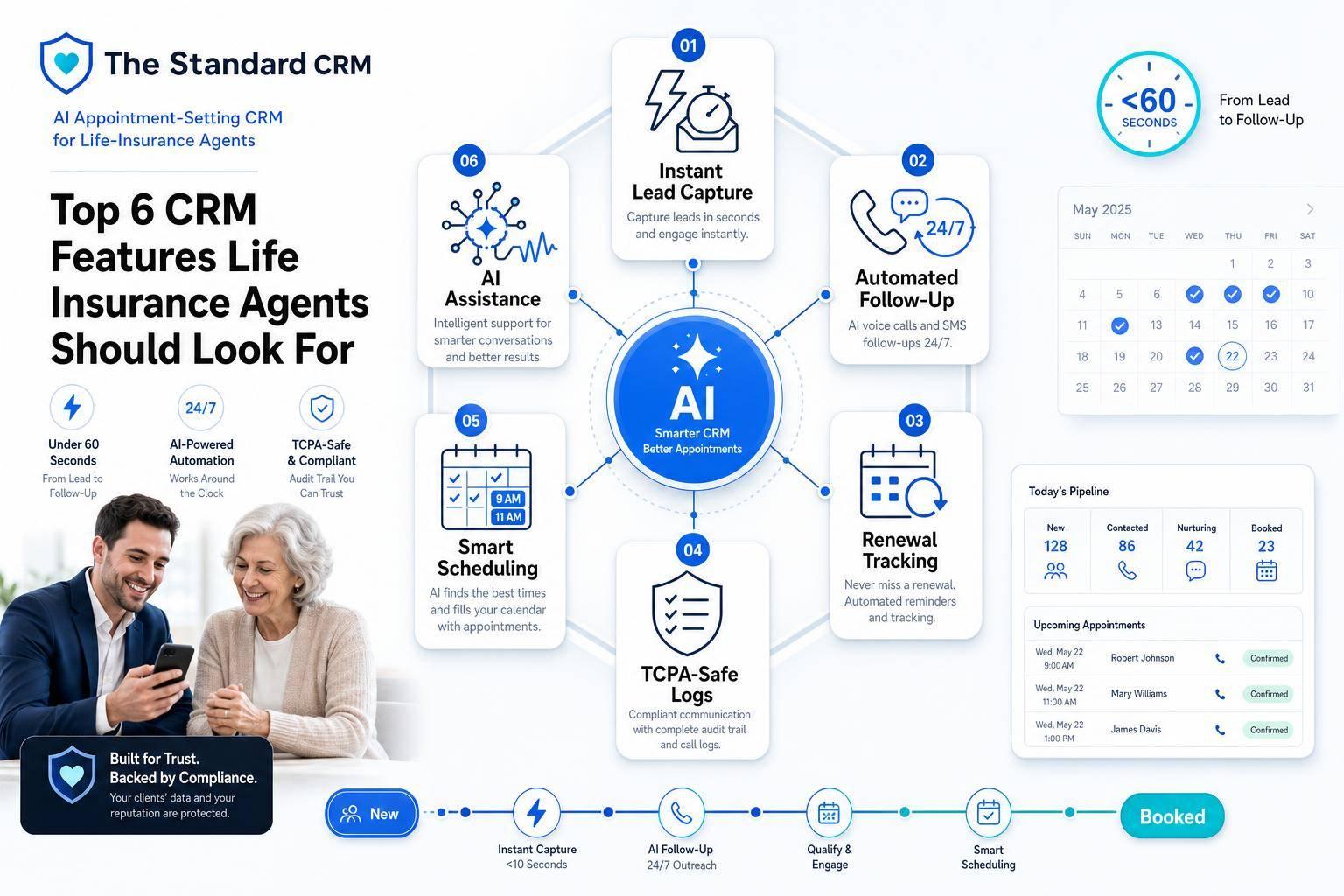
If I were picking a CRM for life insurance, I would care less about the brand and more about six things: lead intake, follow-up, renewals, compliance logs, scheduling, and AI support. That’s because agents can lose 10 to 15 selling hours per week to admin work, and many agencies lose 16% to 17% of their book each year when follow-up and renewal work slips.
Here’s the short version: if a CRM helps me reply in under 5 minutes, track every lead and policy in one place, trigger renewal reminders at the right time, log calls and texts for TCPA records, and book meetings without back-and-forth, it solves the problems that hit revenue first.
I’d look for these six features:
- Automated lead intake and pipeline tracking
- Automated follow-up across SMS, email, and calls
- Policyholder and renewal tracking
- Compliance-safe logging and consent records
- Calendar sync, booking, and task automation
- AI tools that connect the whole workflow
I've tried them all... This is the BEST CRM For Life Insurance Agents
sbb-itb-b54a2b8
Quick Comparison
| Feature | What I’d want it to do | Why it matters |
|---|---|---|
| Lead intake + pipeline | Pull leads from forms, calls, ads, and referrals into one record | Faster reply time and less manual entry |
| Automated follow-up | Send texts, emails, and call steps based on lead behavior | Helps keep leads from going cold |
| Renewal tracking | Trigger reminders at 90, 60, 30, and 15 days | Helps reduce missed renewals |
| Compliance logging | Store calls, texts, consent proof, and opt-outs | Lowers risk of $500 to $1,500 TCPA penalties per contact |
| Scheduling + workflows | Sync calendars, book meetings, and send reminders | Cuts no-shows and saves agent time |
| AI CRM tools | Qualify leads, route them, book calls, and prep agents | Keeps the process moving with less manual work |
Bottom line: I’d choose the CRM that fits how a life insurance agency works day to day, not the one with the biggest name.
Why CRM Features Matter More Than Brand Names for Life Insurance Agents
For life insurance agents, choosing a CRM should start with workflow fit, not the logo on the homepage.
Here’s why: the day-to-day work in a life insurance agency is different from a standard sales team. Agents deal with leads, renewals, compliance, and scheduling all at once. A general-purpose CRM often assumes a simple sales pipeline - lead comes in, deal moves forward, deal closes. That sounds neat on paper, but it doesn’t match the way insurance relationships work over time.
In insurance, the job doesn’t stop after the first sale. Clients need follow-up, policy reviews, service help, and renewal tracking. That means the CRM can’t treat these tasks like random notes stuffed into a record. It needs to handle renewals, servicing, and compliance as part of the system from the start.
That design choice also affects how fast an agency can get up and running. If a CRM lines up with insurance workflows, it should go live without a pile of admin work or a long setup project. And that matters because each core feature is there to fix a daily problem agents run into.
The best CRM supports how U.S. agencies actually work - from renewal dates to everyday follow-up. Next, we’ll look at the six features that matter most for lead follow-up, renewals, compliance, and scheduling. The first place to check is automated lead capture and pipeline tracking.
1. Automated Lead Capture and Pipeline Tracking
If a CRM matches the way your team works, the first thing to check is simple: how fast it can capture and route new leads.
That matters a lot in life insurance. Leads cool off fast. Someone fills out a form from a Facebook ad, and if an agent waits too long, that person may already be talking to someone else. Roughly 78% of insurance leads are closed by the first agent who responds. So speed-to-contact isn't just nice to have. It's a big part of the sales process.
Automated lead capture pulls in web forms, Facebook leads, referrals, and phone calls right away and puts them into a single contact record. That cuts out manual copying and helps avoid duplicate records. The CRM should also match contacts by email or phone, so each prospect stays tied to one record even when they come in through different channels.
After the lead comes in, pipeline tracking shows agents exactly where each prospect stands. A visual pipeline might look like New Lead → Contacted → Quoted → Application Submitted → Policy Issued. That makes it easier to spot:
- leads that need fast follow-up
- applications stuck in underwriting
- deals that are close to the finish line
The Standard CRM responds to new inquiries within seconds by voice, SMS, and email, then creates or updates the record on its own.
Before turning on automation, map your pipeline stages to your actual sales process. When the workflow lines up with how your agency sells, each lead starts in the right stage and moves forward without manual cleanup. Then the focus shifts from data entry to follow-up.
2. Automated Lead Nurturing and AI-Driven Follow-Up
Getting the lead is just the start. What matters next is whether the CRM keeps the conversation moving without your team doing every follow-up by hand.
A solid CRM should send the right mix of SMS, email, and voice messages based on where the lead sits in the funnel and how that person is reacting. The first response should go out right away, and the rest of the sequence should stay consistent. But not every lead should get the same treatment.
Medicare Advantage leads usually need a heavier cadence early on. Final Expense leads tend to respond best to fast, repeated outreach. IUL and retirement leads often do better with a slower, more educational pace. If every lead gets the same follow-up, results usually slip.
This is where AI-driven follow-up starts to matter. Instead of sticking to a fixed timeline, the CRM can react to what the lead actually does. If someone opens an email, misses a call, or clicks a link, the system can trigger the next step on its own. That means fewer leads sitting idle and fewer hours spent chasing people who aren't ready yet.
Missed-call text-back is a good example. If a prospect doesn't answer, the CRM can send a text right away and pull that person back into the conversation. This can recover 25% to 40% of leads that would otherwise go cold.
And once a lead converts, the same system shouldn't stop. It should also support policyholder service and renewal timing, so follow-up continues after the sale instead of dropping off.
3. Policyholder and Renewal Management
Once a lead turns into a client, the CRM's job changes. At that point, it shouldn't just help with follow-up. It should help the agency keep the client, stay on top of service work, and spot cross-sell chances without making agents dig through scattered records.
At the center of this feature are renewal reminders and follow-up sequences. The system should flag expiring policies at the 90-, 60-, 30-, and 15-day marks and trigger outreach on its own. That's how a good CRM keeps renewal work from slipping through the cracks. And that same visibility shouldn't stop with the named policyholder. It should cover the entire household.
A full-household view pulls spouses, dependents, and beneficiaries into one account. That matters because single-policy households lapse more often than households with multiple policies. When an agent can see the whole picture in one place, cross-sell talks get a lot easier and a lot more natural.
For term policies, conversion dates deserve the same attention as renewal dates. The CRM should flag conversion windows so agents know when a policy is getting close to the end and can talk through a move to whole life coverage. Miss that window, and the agency may lose both the policy and the client.
4. Compliance-Safe Communication and Activity Logging
Compliance is the record-keeping layer behind every automated touchpoint in Sections 1 through 3. Every call, text, and email needs an audit-ready trail in the CRM. If that trail is messy or missing, leads can fall through the cracks, and renewals get harder to manage. Put simply: automation only works when every touchpoint is logged.
A compliance-ready CRM should log the timestamp, duration, agent, disposition, and call recording for each call, with the recording stored in the CRM and kept for at least 90 days. For texts and emails, the system should record the exact message content, timestamps, delivery status, and any opt-out requests. If a prospect replies "STOP", that number should be suppressed at once across connected tools. DNC scrubs should run when leads are imported and then every 31 days.
The money risk here is serious. TCPA violations can cost between $500 and $1,500 per individual call or text. On top of that, most state insurance departments require communication records to stay on file for 5 to 7 years after a policy expires. The Standard CRM builds TCPA, DNC, and A2P 10DLC compliance into its outreach workflows, which helps agents avoid relying on manual checks.
A compliant system should also keep consent documentation tied to the lead record at intake. That includes the consent URL, disclosure snapshot, TrustedForm or Jornaya tokens, and the specific sellers named on the consent form. Under the FCC's one-to-one consent rule, each seller must be named one by one in the disclosure. Those fields matter because they turn consent into proof instead of a guess.
Role-based access also matters. It limits who can view sensitive records and logs who accessed each record and when.
The table below shows what each communication type needs to be audit-ready:
| Communication Type | Required Data Points |
|---|---|
| Calls | Timestamp, duration, recording, disposition code, agent ID, disclosure statement confirmation |
| Texts | Message content, timestamp, opt-in method, TrustedForm/Jornaya token, opt-out (STOP) log |
| Emails | Full content, timestamp, delivery/open status, unsubscribe link confirmation |
Once outreach is fully logged, scheduling and workflow automation keep the next step from slipping.
5. Integrated Calendar, Scheduling, and Workflow Automation
Once outreach is in the CRM, the next snag is simple: getting appointments booked and keeping them on the calendar. A CRM with built-in calendar sync and workflow automation cuts down that friction.
Two-way calendar sync is the starting point. It keeps the CRM and Google or Outlook in sync in real time, which helps stop double-booking before it happens. From there, the next step is making booking easy for prospects. Self-service booking links let people pick a time for a quote call on their own, without the usual back-and-forth.
The Standard CRM pushes this further with AI-driven scheduling. Its AI agent qualifies leads by SMS or voice and books 15-minute appointments on the agent's calendar 24/7. That matters for leads who'd rather call than text, especially people who call after business hours. Once the meeting is set, the CRM should also help make sure it stays set.
After booking, automation should guard the appointment. An SMS reminder 24 hours before the meeting can cut down on no-shows without any manual work. If a call is marked "Appointment Set," the CRM should send confirmation and reminder messages, then create the next task on its own.
That next-best-action setup is where workflow automation starts to pay off. The CRM surfaces the next step automatically, so agents can open the system and see exactly which lead or renewal needs attention. That can give back up to 15 hours of selling time per week.
| Feature | What It Does for Agents |
|---|---|
| Two-Way Calendar Sync | Prevents double-booking across Google/Outlook and the CRM |
| AI Booking Links | Qualifies leads and sets appointments 24/7 without agent involvement |
| Automated SMS Reminders | Reduces no-shows before scheduled appointments |
| Next-Action Tasks | Auto-generates the exact next step after each call disposition |
6. AI-Powered CRM Capabilities in The Standard CRM
These capabilities connect separate tasks into one lead-to-client workflow. In The Standard CRM, lead capture, follow-up, booking, and logging all happen in the same flow.
It starts with instant lead response. New inquiries get a reply by voice, SMS, and email within seconds.
From there, the AI agent qualifies the lead and books the appointment. The assigned agent also gets a brief lead summary, so they’re not walking in cold.
For agencies with multiple agents, The Standard CRM supports separate agent calendars and a manager dashboard. That makes it easier to route appointments without creating a mess behind the scenes.
Calls, recordings, and dispositions are logged automatically on the client record. The next section breaks down what each feature should include.
What to Look for Inside Each CRM Feature
Before you pick a CRM, check what each feature can actually do in day-to-day agency work. Plenty of tools sound good on a sales page. The gap shows up when your team starts using them every day.
Lead capture should bring every source into one shared inbox: web forms, Facebook ads, phone calls, referrals, and social DMs. You also want missed-call text-back within 60 seconds and full source coverage, so a lead doesn't disappear the moment it comes in.
Pipeline tracking should let you set custom stages that match your sales process, such as Inquiry → Application → In-Force. It should also support separate pipelines by product line. That makes reporting cleaner and follow-up easier to manage.
Renewal management should run automated workflows at 90, 60, 30, and 7 days before a policy expires. Don't settle for one-off reminders. The system should handle multi-step sequences.
Compliance features should keep consent timestamps plus TrustedForm or Jornaya tokens on file. They should also scrub leads against national, state, and internal DNC lists every 31 days. Activity logs need to be timestamped and tamper-resistant.
Calendar and scheduling tools should include real-time two-way sync and automatic time-zone enforcement for TCPA calling windows. It also helps if the CRM can send new leads to the right person through round-robin routing or AI scoring, so assignment happens fast.
The last feature to review is AI-driven CRM workflow. This is the part that connects lead capture, follow-up, and booking. AI-powered capabilities should respond to leads right away by voice, SMS, and email, qualify the lead, book the appointment on the correct agent's calendar, and send the agent a lead summary before the call. If you run a multi-agent agency, look for automated routing and a manager dashboard that handles assignment without manual work.
Once you've checked what each feature is supposed to do, the next step is simple: compare how smoothly those parts work together in daily use.
Side-by-Side Comparisons to Show the Difference
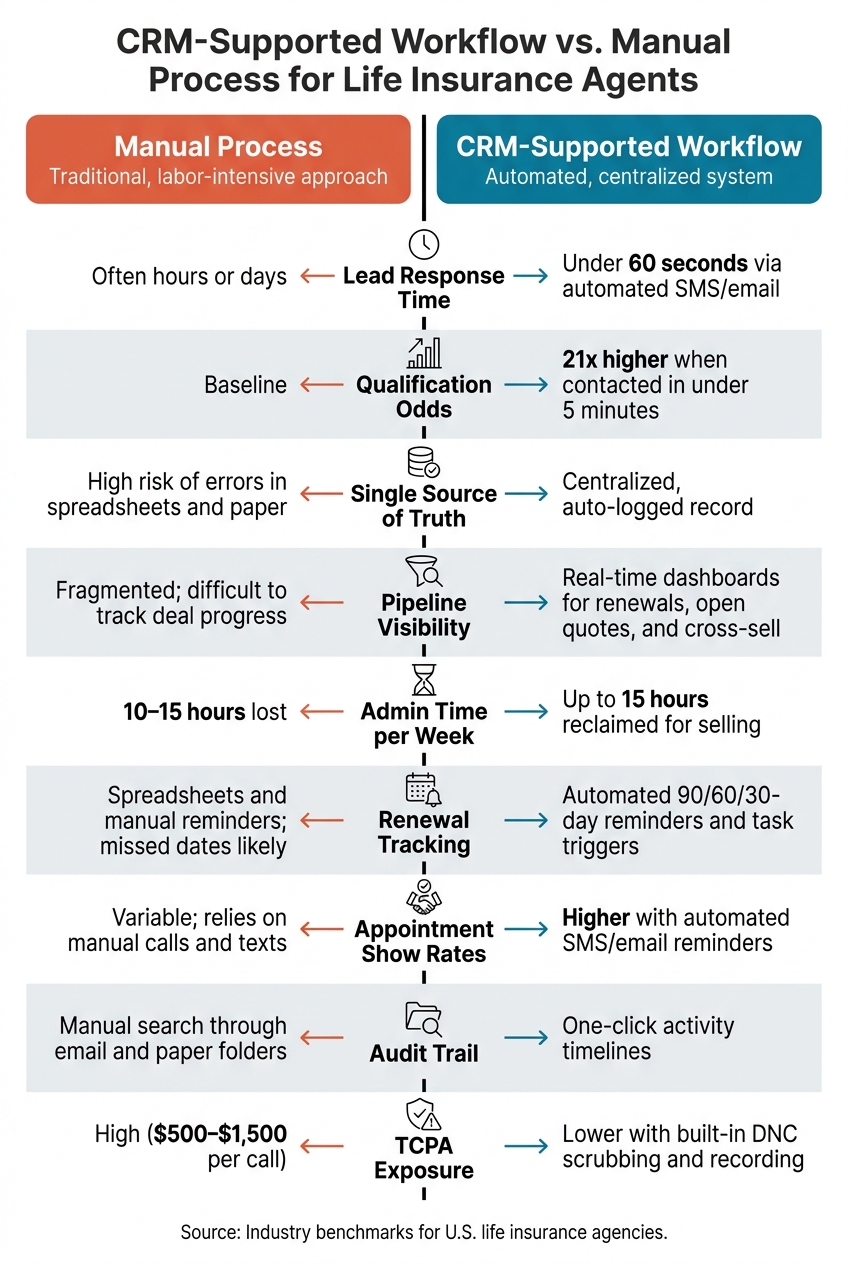
CRM vs. Manual Workflow: Key Metrics for Life Insurance Agents
The numbers below make the gap between manual work and CRM automation pretty clear. This is where the day-to-day difference shows up.
Agents who respond to inbound life insurance inquiries within 5 minutes are about 21 times more likely to qualify the lead than agents who wait 30+ minutes. A CRM can send that first response in under 60 seconds.
Manual admin work also eats into selling time. Agencies often lose 10–15 hours per week to tasks like hunting down client details and logging calls.
Here’s a quick side-by-side view of the biggest operating differences:
| Metric | Manual Process | CRM-Supported Workflow |
|---|---|---|
| Lead Response Time | Often hours or days | Under 60 seconds via automated SMS/email |
| Qualification Odds | Baseline | 21x higher when contacted in under 5 minutes |
| Single Source of Truth | High risk of errors in spreadsheets and paper | Centralized, auto-logged record |
| Pipeline Visibility | Fragmented; difficult to track deal progress | Real-time dashboards for renewals, open quotes, and cross-sell opportunities |
| Admin Time per Week | 10–15 hours lost | Up to 15 hours reclaimed for selling |
| Renewal Tracking | Spreadsheets and manual reminders make missed dates more likely | Automated 90/60/30-day reminders and task triggers |
| Appointment Show Rates | Variable; relies on manual calls and texts | Higher with automated SMS/email reminders |
| Audit Trail | Manual search through email and paper folders | One-click activity timelines |
| TCPA Exposure | High ($500–$1,500 per call) | Lower with built-in DNC scrubbing and recording |
If you're trying to figure out where the pain is worst, this table gives you a simple way to spot it. Maybe the biggest issue is slow lead follow-up. Maybe it’s missed renewals, messy records, or too much admin drag. Either way, this comparison helps you see which gap matters most before you move to the evaluation checklist.
How to Evaluate These CRM Features for Your Agency
Use the six features above as a simple scorecard for your agency’s workflow. Start with two basics: lead volume and team size. Those two factors shape which features matter most. A solo agent usually needs simplicity, lower cost, and automated renewal tracking. A team with 5 to 20 agents needs round-robin lead assignment, visual pipeline management, and tools that show who’s following up and who’s dropping the ball.
If you buy leads from more than one source, source attribution matters. Without it, you’re guessing. Your CRM should show which lead sources are turning into policies, so you can spot what’s worth your money and what isn’t.
After lead tracking, look at how the CRM protects the records tied to each contact. For compliance, don’t stop at “Does it support TCPA?” Get specific. Ask how it stores consent, how it handles opt-outs, and how it re-scrubs DNC lists. Under current FCC rules, consent must name your agency specifically, and DNC lists should be scrubbed when imported and then re-scrubbed every 31 days.
Once scheduling is set up, make sure it works across time zones and calendars. This matters a lot for multi-state sales. You’ll want timezone-aware automation and two-way calendar sync with buffer times. The CRM should pick up a prospect’s local time zone from a ZIP code or area code and limit automated outreach to the local 8:00 AM to 9:00 PM window.
Before you commit, test the mobile experience. Don’t just glance at the app store screenshots. Open the app and check whether your team can handle day-to-day work from a phone, including:
- Tasks
- Calendar
- Notes
- Voice-to-text entry
- Offline client history
These filters make it much easier to cut down your shortlist and find the CRM that matches how your agency works day to day.
Conclusion
After looking at these six features, the takeaway is pretty simple: the best CRM is the one that fits your workflow. It should help your agency handle lead capture, follow-up, renewal tracking, compliant logging, scheduling, and AI automation without adding extra friction.
Most life insurance agencies lose 16% to 17% of their book each year. That’s exactly why renewal automation matters. It helps protect business that might otherwise slip away.
The agents writing the most business are the ones using a CRM that handles follow-up, renewal nudges, and cross-sell prompts during quote calls. In plain English, your CRM should make follow-up happen every single time instead of leaving it up to memory.
Use these six features as your checklist. If a CRM can’t show each one clearly, it isn’t built for life insurance workflows. That’s the standard to use when you compare any CRM.
FAQs
How fast should a CRM respond to new leads?
For the best results, a CRM should respond to new leads in under 60 seconds. That short window can improve contact rates in a big way compared with slower follow-up.
The ideal setup is simple: the CRM assigns the lead automatically, then sends an SMS or starts an AI voice call right away. While 5 minutes is often treated as the baseline, the real target is under 60 seconds.
What renewal reminders should a life insurance CRM include?
A good life insurance CRM should automate renewal reminders so policies don't slip through the cracks and client relationships stay on track.
It should track policy expiration dates and send reminders at 90, 60, and 30 days before renewal. That gives agents enough time to follow up without turning the process into a last-minute scramble.
It should also flag term policies that are getting close to the end of the term, support AI-assisted outreach drafts for review, and keep audit-ready logs of all communications for compliance.
How does a CRM help with TCPA compliance?
A CRM can help with TCPA compliance because it keeps consent and outreach records in one place. That matters. When everything lives in a central system, it’s much easier to see who gave permission, when they gave it, and how your team contacted them.
It can also restrict calls to allowed hours, usually 8:00 AM to 9:00 PM in the prospect’s local time. On top of that, it can store consent details like:
- The date
- The method used to get consent
- The disclosure language shown at the time
A CRM also helps you keep those records for the four-year statute of limitations. And if someone opts out, the system can automatically suppress that number so your team doesn’t contact it again. That includes opt-out requests sent by SMS or added manually from other channels.