
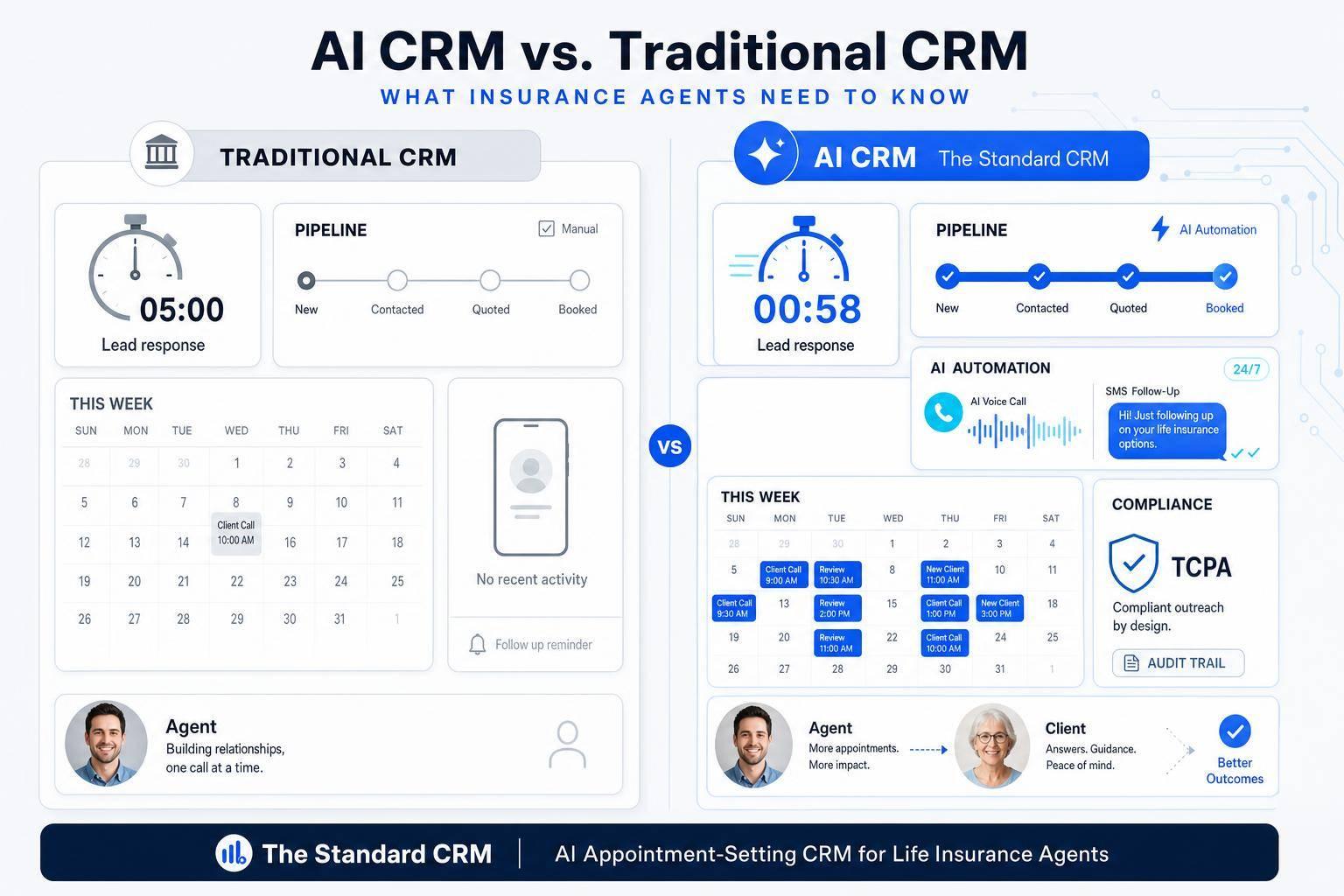
AI CRM vs. Traditional CRM: What Insurance Agents Need to Know
If your team takes more than 5 minutes to reply to a lead, you may be losing sales. For insurance agents, the choice often comes down to this: do you want a CRM that mainly stores data, or one that also handles follow-up, booking, and renewal outreach for you?
Here’s the short version:
- Standard CRM fits smaller books, lower lead flow, and teams that can keep up with manual tasks.
- AI CRM fits higher lead flow, after-hours inquiries, renewal-heavy books, and teams that need replies in under 60 seconds.
- The main areas to compare are lead response, qualification, follow-up, client messaging, renewals, scheduling, team growth, and compliance logging.
- This matters because 78% of leads go to the first agent who responds, and agencies lose 16% to 17% of their book each year.
I’d look at one question first: how much work still depends on someone remembering to do it? If the answer is “a lot,” AI may be the better fit.
Quick take:
| Area | Standard CRM | AI CRM |
|---|---|---|
| Lead reply | Agent responds manually | Auto-reply in seconds |
| Lead screening | Agent asks questions | AI asks and scores |
| Follow-up | Reminders and templates | Auto sequences based on behavior |
| Renewals | Calendar tasks and spreadsheets | Built-in policy tracking and timed outreach |
| Scheduling | Manual back-and-forth | Auto booking and sync |
| After-hours leads | Wait until next business day | 24/7 SMS or voice reply |
| Best fit | Solo agents, low lead flow | Growing teams, paid leads, more moving parts |
So if you run a small, referral-based book, a basic setup may be enough. But if your team buys leads, works across many policy dates, or misses follow-ups when things get busy, AI CRM can help protect speed, consistency, and renewal follow-through.
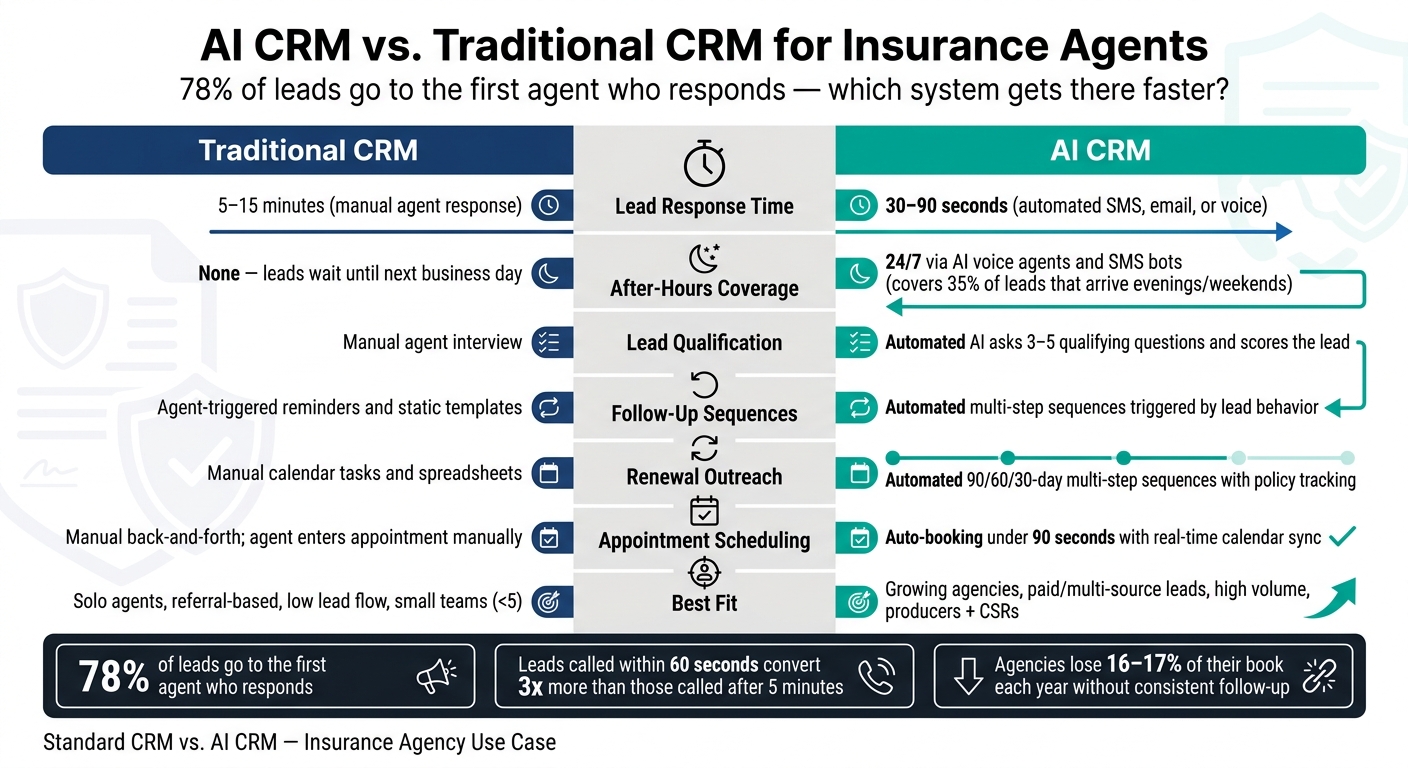
AI CRM vs. Traditional CRM for Insurance Agents: Key Differences
How Each CRM Handles Lead Capture and Follow-Up
Lead Response Speed and Qualification
Insurance leads don’t wait around. 78% go to the first agent who responds, and a lead called within 60 seconds converts 3x more than one called after 5 minutes.
That’s where the gap starts to show.
A standard CRM will usually send a notification, and then the agent has to pick up the lead from there. In practice, that often means a 5 to 15 minute delay. An AI CRM can jump in within 30 to 90 seconds through automated SMS, email, or voice outreach. It can also ask 3 to 5 qualifying questions before the lead ever gets to the agent. So by the time there’s a handoff, the prospect is already scored and routed.
After-hours leads make the difference even more obvious. About 35% of insurance leads come in during evenings or weekends. A standard CRM usually leaves those leads sitting until the next business day. An AI CRM can respond 24/7 with AI voice agents and SMS bots.
Follow-Up Sequences and Pipeline Updates
With a standard CRM, follow-up still leans heavily on the agent to remember what comes next. Templates and reminders help, sure, but the agent still has to trigger each next step.
An AI CRM takes more of that off the agent’s plate. It can send follow-ups automatically based on lead behavior and conversation outcomes. It can also update pipeline stages without manual drag-and-drop and add call summaries right inside the contact record.
| Feature | Standard CRM | AI CRM |
|---|---|---|
| Lead Response Time | 5–15 minutes (manual) | 30–90 seconds (automated) |
| After-Hours Coverage | None; leads wait until next business day | 24/7 via AI voice and SMS bots |
| Qualification | Manual agent interview | Automated real-time AI questioning and scoring |
| Notes | Manual entry per interaction | Auto-generated conversation summaries |
| Pipeline Updates | Manual stage changes by agent | Automatic triggers based on lead actions |
That same automation also changes how agents deal with client messages, renewals, and appointment reminders.
sbb-itb-b54a2b8
AI CRM vs Traditional CRM: What's the Difference?
Client Communication, Renewals, and Scheduling
After that first lead touch, retention comes down to three things: steady communication, on-time renewals, and fast scheduling.
Personalized Communication Across SMS, Email, and Voice
Retention starts with messages that fit what the client just did or said.
A standard CRM usually sends static templates. An AI CRM uses past conversations and engagement history to draft messages that feel more relevant. That means agents don't have to dig through notes before every follow-up.
SMS tends to beat email on opens, so channel coordination matters. Instead of treating SMS, email, and voice as separate tracks, an AI CRM keeps them aligned. The result is simple: fewer gaps, fewer missed follow-ups, and less manual work.
Renewal Reminders and Policy Lifecycle Tracking
After the first sale, retention depends on staying on top of policy dates and following up at the right time.
A standard CRM often stores policies like generic deal records. Renewal dates, carrier details, and premium changes may end up in spreadsheets or calendar reminders. And when a reminder slips, the renewal can slip with it.
An AI CRM built for insurance uses policy records that track effective dates, carriers, premiums, and commission structures natively. From there, it can trigger a multi-step renewal sequence on its own. For example:
- Email at 90 days out
- Follow-up email and SMS at 60 days
- Phone task for the agent at 30 days
The agent doesn't need to manage each step by hand.
Appointment Scheduling and Calendar Syncing
Once renewal timing is handled, the next choke point is getting the review call on the calendar.
With a standard CRM, the agent usually sees the lead notification, reaches out to find a time, and then enters the appointment manually.
An AI CRM can book, confirm, and sync the appointment automatically. It also adds a prospect summary to the booking, so the agent starts the call with context instead of going in cold.
| Feature | Standard CRM | AI CRM |
|---|---|---|
| Personalization | Static templates; manual data entry | Context-aware; drafts based on conversation history |
| Channel Coordination | Mostly email; manual SMS/voice steps | Automated SMS, email, and voice in sync |
| Renewal Outreach | Manual tasks or calendar reminders | Automated 90/60/30-day multi-step sequences |
| Booking Speed | Manual back-and-forth | Automated booking under 90 seconds |
| Calendar Syncing | Basic integration; manual entry | Real-time syncing with prospect summaries |
| Agent Handoff Quality | Basic contact info; agent starts cold | AI-generated summaries with full lead context |
When a Standard CRM Is Enough and When AI CRM Adds More Value
After lead capture, follow-up, communication, and renewals, the main issue is simple: how much of the work still depends on a person doing it by hand?
Situations Where a Standard CRM May Be Sufficient
If your book of business comes mostly from referrals, inbound lead flow is light, and you work alone or with one other person, a standard CRM can handle the core jobs. You may only need a place to store contacts, log notes, and set manual reminders.
In that setup, good organization matters more than heavy automation. If the pace is steady and easy to manage, a basic CRM often does the job.
Situations Where AI CRM Improves Speed and Efficiency
That changes fast when lead flow picks up, messages start coming in after hours, or compliance work begins to pile up.
Once you start buying leads, speed matters. Sub-60-second response times can make a big difference, and manual outreach usually misses that mark. Then there's the after-hours issue: 35% of insurance leads arrive during evenings and weekends. With a standard CRM, those leads often sit untouched until the next business day.
An AI CRM built for life insurance work can reply in seconds through voice, SMS, and email. It can qualify leads through back-and-forth conversation and book appointments on its own. It can also help with TCPA and DNC rules and give agents a detailed prospect brief before each scheduled call.
Team growth is another turning point. Add more producers or CSRs, and things get messy fast unless the system can keep up. AI-native platforms made for agencies tend to scale better because they include insurance-specific workflows and make audit trails easier to keep.
| Factor | Standard CRM | AI CRM |
|---|---|---|
| Lead Volume | Low; referral-based or organic | High-volume; paid or multi-source leads |
| Team Size | Solo or very small teams (<5) | Growing agencies with producers and CSRs |
| Automation Need | Basic email drips and task reminders | Multi-channel SMS, voice, and email with AI booking |
| Service Complexity | Single-product, low-touch | High-volume, multi-step |
| Compliance Workload | Manual logging and document storage | Automated audit trails and insurance-specific fields |
| Response Speed | Manual (5–15+ minutes) | AI-driven (under 60 seconds) |
Conclusion: How Insurance Agents Should Make the Decision
After lead capture, follow-up, communication, and renewals, the choice comes down to one thing: how much manual work your team still wants to carry. The core issue isn't whether your CRM stores contact records. It's whether it handles follow-up for you or just sits there like a digital filing cabinet.
A standard CRM can work fine when lead volume is low, the team is small, and follow-up is pretty simple. But once you start buying leads or managing a growing renewal book, manual follow-up tends to slip. People get busy. Tasks pile up. Calls and reminders get missed. That's when automation starts to earn its keep.
Pick the CRM your team can use and maintain on a steady basis. If no one can run it, no one will use it. And if you don't have a dedicated admin to set up and manage a more complex platform, an automation-first CRM usually has a better shot at being used day after day. That matters because the best system isn't the one with the longest feature list. It's the one your producers actually adopt.
If you work across multiple states or deal with commercial lines, built-in audit trails and insurance-specific logging matter a lot more. On the other hand, if you're running a smaller personal-lines book with simpler workflows, a lighter setup may do the job. As the number of policy dates and client touchpoints grows, manual systems start to crack.
A simple way to check: are producers spending more than a minute logging each interaction? If they are, automation can make a real difference in lead response, renewal tracking, and scheduling. At that point, AI CRM stops feeling like a nice extra and starts looking like a practical way to protect speed, follow-up, and consistency.
FAQs
How do I know if AI CRM is worth it for my agency?
It depends more on your agency’s readiness than on features alone. An AI CRM makes more sense when you already have clean client data, documented sales processes, and enough lead volume to justify the setup time and day-to-day oversight.
If your data is messy or your process lives in people’s heads, a standard CRM is often the better place to start. The tool is worth it when it cuts manual work for things like renewal reminders, lead scoring, and lead routing - instead of giving your team one more system to manage.
Can a traditional CRM still work for a small insurance team?
Yes, but expect slower response times and more manual work.
Traditional CRMs are solid for storing data. The catch is that they often don’t include insurance-specific automation, like renewal logic or policy-native fields.
You can make one work. But it may take 100+ hours of custom setup, plus monthly upkeep after that. If your agency wants better efficiency, automated policy tracking, and smooth lead response, a purpose-built system is usually the better fit.
What insurance tasks does AI CRM automate best?
AI CRM can take a lot of the busywork out of insurance. It automates key tasks like lead capture, qualification, routing, and immediate follow-up, so agents don’t have to chase every step by hand.
It also helps with policy renewals by sending automated reminder sequences at the right time. And with predictive lead scoring, agents can focus on the prospects most likely to convert instead of treating every lead the same.
On top of that, it can:
- Handle appointment scheduling
- Answer common policy questions
- Summarize client histories before calls
- Support personalized cross-sell campaigns tied to life events
- Manage routine service and documentation tasks
That means less time spent on admin work and more time for actual client conversations.